
Finding the right learning management system (LMS) for your classroom can be tricky. But here's some good news: over 90% of teachers think a solid LMS can really boost learning. With tech moving fast, it's smart to use free LMS platforms made for teachers. In this 2025 guide, we'll check out some top-notch, user-friendly options like Moodle, Canvas, and the new Deepbrain AI. Whether you're an experienced teacher or just starting out, these platforms have tools to make your classroom lively and engaging. So, let's explore how the right LMS can change your teaching game!
Moodle: A Leading Open-Source LMS
Moodle Overview: A Free LMS for Teachers
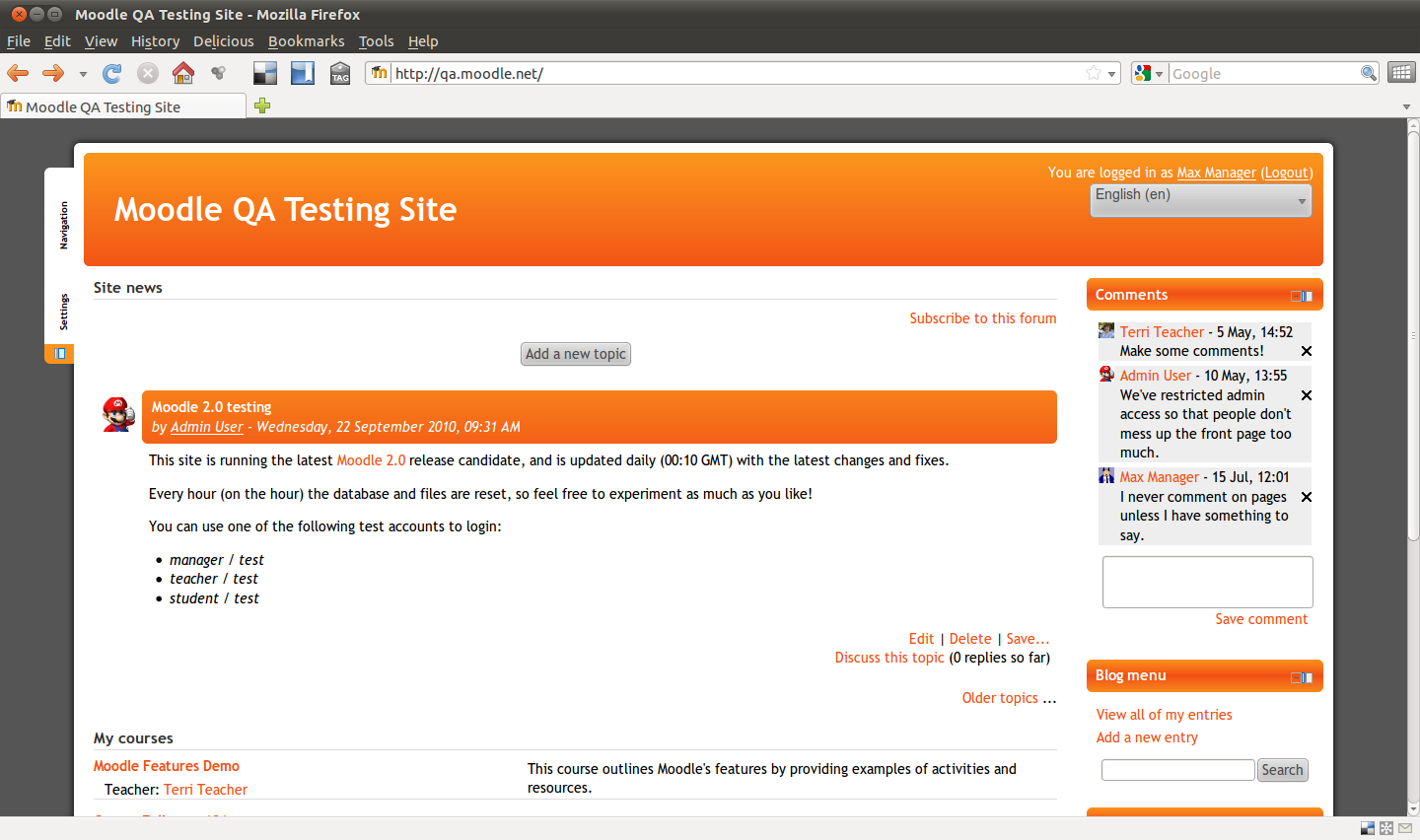
Moodle is a popular open-source Learning Management System (LMS) used by schools, companies, and training groups worldwide. Its modular setup and extensive plugin library allow for customization to meet specific needs. Moodle supports various learning styles, such as blended learning and flipped classrooms, and it is multilingual, making it accessible globally. Being free with no licensing fees, Moodle benefits from continuous updates by a vibrant community of users and developers. This makes it an excellent choice for universities, schools, and businesses seeking a flexible LMS.
Key Features of Moodle for Educators
Moodle offers a range of features catering to diverse educational needs, providing tools for both course creation and management. Teachers can build courses from scratch, tailoring the structure, format, and user interface to their preferences. The intuitive course management system allows administrators to manage student access, set up schedules, moderate discussions, and create learning paths.
Moodle's comprehensive assessment tools support quizzes, assignments, group chats, and gradebooks, aligning with course goals like certifications for a complete learning framework. The latest Moodle 4.5 version introduces an AI subsystem to enhance learning efficiency and safety, integrating with OpenAI and other AI models.
Moodle supports blended learning, combining self-paced eLearning with live classes. It includes attendance tracking and scheduling tools for a holistic learning experience. Explore Moodle's features.
Customizable Dashboards for Teachers
Teachers can set up personalized dashboards, providing students with a clear view of their courses, assignments, and due dates, aiding in organization and goal focus.
Collaborative Tools for Classroom Engagement
Moodle fosters collaboration through forums, wikis, and chat rooms, facilitating communication and teamwork among students, thus cultivating a sense of community and shared learning.
Effective Assessment and Feedback Mechanisms
Moodle's robust assessment tools offer various evaluation methods, including quizzes and assignments. It also supports detailed feedback, enabling teachers to provide constructive and timely responses to student work.
Pros and Cons of Using Moodle
Understanding Moodle's pros and cons helps educators determine its suitability for their needs.
Pros of Moodle for Teachers
- Flexibility and Customization: As an open-source platform, Moodle allows for extensive customization, often exceeding proprietary systems.
- Cost-Effective: Being free, Moodle reduces the financial burden on schools and educators.
- Community Support: A vibrant community of developers and users ensures ongoing improvements and support.
- Scalability: Moodle accommodates a range of users, from small classes to large universities, making it suitable for any educational setting.
Cons of Implementing Moodle
- Complex Setup: Initial setup can be challenging, particularly for those lacking technical expertise.
- User Interface: Some users find Moodle's interface less intuitive than other systems, resulting in a learning curve for newcomers.
- Maintenance: Maintaining the system and ensuring smooth operation can be difficult for institutions without dedicated IT support. Discover more about Moodle's pros and cons.
Functionality and Ease of Use in Moodle
Moodle provides a streamlined interface that minimizes clutter, simplifying course management for administrators. While powerful, setting up and using some advanced features may require technical knowledge, posing a challenge for beginners. However, once familiarized, the platform's depth is impressive.
Easy Course Creation for Teachers
Creating courses in Moodle is straightforward, with a step-by-step guide assisting teachers in adding and organizing content. It supports various content types, such as text, video, and interactive elements, making it easy to create engaging courses.
Cost-Effectiveness of Moodle as a Free LMS
One of Moodle's standout features is its cost-effectiveness. As a free LMS, it is a budget-friendly choice for educators and institutions. The absence of licensing fees makes it accessible to everyone, from individual teachers to large organizations. Being open-source, Moodle benefits from a global community of developers, leading to regular updates and improvements without additional costs.
Long-Term Savings with Moodle
Though setting up Moodle may require time and technical resources, the long-term savings on licensing fees and software costs make it a wise choice for many educational institutions.
Learn more about Moodle's cost-effectiveness.
Customer Support for Moodle Users
Moodle boasts a large, active community offering development, updates, and support resources. The Moodle community forums serve as a hub for discussion and troubleshooting, where users can seek advice and share experiences. Comprehensive documentation covers everything from installation to advanced customization. Additionally, many organizations offer Moodle training and workshops to help educators maximize the platform's potential. For personalized assistance, professional support services are available, often from Moodle partners, offering tailored support packages that include installation, customization, and ongoing maintenance. Explore Moodle's support options.
Canvas: User-Friendly and Versatile Free LMS
Canvas LMS Overview
Canvas is a popular learning management system (LMS) that excels in both online and blended learning environments. Designed for teachers, course designers, and students, it provides a comprehensive set of tools for course creation, content delivery, student assessment, and collaboration. An outstanding feature is its free version, Canvas Free for Teachers, ideal for educators without a school's license, making it a great no-cost LMS option. As a cloud-based platform, Canvas ensures easy access to course materials anytime, fostering student engagement and interaction.
Key Features of Canvas LMS
Canvas is packed with features that enhance teaching effectiveness:
- Flexible Course Design: Supports assignments, discussions, modules, quizzes, and pages.
- Collaboration Tools: Includes groups, conferences, and peer reviews for building a learning community.
- AI-Powered Features: Offers discussion summaries, language translation, and quick content finders for streamlined teaching and learning.

- Modules: Organize course materials and activities in a student-friendly sequence.
- Advanced Assessment Options: New Quizzes and exportable student reports for customized assessments.
- ePortfolios: Showcase student work effectively.
- App Integration: Connects with numerous external apps via the Canvas App Center.
- Analytics: Provides insights into student performance and learning journeys.
Pros and Cons of Free Canvas LMS
Pros:
- Customizable Course Design: Tailor courses to meet specific educational needs.
- Strong Collaboration and Communication Tools: Facilitate community building and interaction.
- Robust Assessment Features: Comprehensive grading and feedback systems.
- Free Version for Teachers: Offers essential tools without cost.
- Wide App Integrations: Expands functionality and ease of use.
- AI Tools: Save time in managing courses and communication.
Cons:
- Advanced Features Require Paid License: Some features and integrations are not available without a paid institutional license.
- Learning Curve: Initial setup and navigation customization can be time-consuming for new users.
Canvas LMS Functionality and Ease of Use
Canvas is renowned for its user-friendly interface, simplifying course creation and management. Its module system offers a clear path for course content, minimizing student confusion. Tools like SpeedGrader and the Gradebook streamline assessments and feedback. AI tools and integrations, such as discussion summaries and language translation, enhance usability and accessibility. Customizable navigation menus allow instructors to tailor the student experience to various educational needs.
Cost-Effectiveness of Using Canvas LMS
For budget-conscious educators, Canvas provides a robust set of features for free through its Canvas Free for Teachers. This version meets most classroom needs, offering essential tools for course creation, communication, and assessment. However, paid institutional licenses unlock additional features, analytics, and support, which may be valuable for larger schools seeking advanced options.
Canvas LMS Customer Support
Canvas offers a wealth of online guides, community forums, and help documents for self-service support, ensuring educators can effectively utilize the platform. Licensed schools typically receive dedicated support, while free users rely on community resources. This support structure enables quick issue resolution, maintaining the focus on teaching and learning.

These resources underscore Canvas's commitment to a positive user experience, allowing educators to concentrate on what truly matters: student learning.
Deepbrain AI: Innovative AI Studios
Overview of DeepBrain AI Studios for Teachers
DeepBrain AI’s AI Studios is a transformative tool in the realm of video production, harnessing the power of artificial intelligence to revolutionize the creation process. With AI avatars, voice synthesis, and automated editing, you can craft professional videos without the need for advanced equipment or technical expertise.
This platform is incredibly versatile, making it ideal for educational content, marketing, and business communication. It includes tools for script writing, image creation, and screen recording, establishing itself as a comprehensive resource for content creators. Moreover, its integration with ElevenLabs enhances your videos with lifelike voiceovers and multilingual dubbing, broadening your reach to a global audience in a genuine and natural manner.
Key Features of DeepBrain AI for Educators
AI Studios by DeepBrain AI is equipped with a suite of features designed to meet diverse user needs:
- Custom AI Avatars: Create personalized avatars by uploading photos or using a webcam. Alternatively, choose from a library of over 100 photorealistic AI avatars and templates.
- Multilingual Video Production: Supports over 80 languages with automatic lip sync and emotion control for a polished finish.
- Built-in Browser Editor: Easily trim and add transitions to your videos. Collaborate with teams in real-time and share projects via links.
- Voice Cloning and Dubbing: With ElevenLabs, add expressive narration through voice cloning and multilingual dubbing.
- Screen Recording and Highlights Extraction: Perfect for tutorials or demos, enhancing instructional content.
Pros and Cons of Using DeepBrain AI
Pros:
- User-Friendly Interface: Simplifies video creation with helpful guides and a straightforward workflow.
- Cost-Effective: Reduces the need for actors or studios, keeping production costs low.
- Global Reach: Multilingual support allows for worldwide content delivery.
Cons:
- Advanced Features Limited to Higher-Tier Plans: Some premium avatars and features require upgraded plans.
- Internet Dependency: Requires a stable internet connection, which may be an issue in areas with poor connectivity.
- Limited Free Trial Outputs: The free trial may not fully showcase the platform's capabilities.
Functionality and Ease of Use for Teachers
AI Studios is designed for simplicity, making it accessible to users without technical skills. The workflow is intuitive, from script to video, with pop-up guides and a template library to expedite content creation. Real-time collaboration features enhance team productivity and creativity, all within a browser, eliminating the need for additional software.
Cost-Effectiveness for Educational Use
AI Studios is budget-friendly, offering a free plan for basic use, with paid plans starting at $15 per month for AI Studios or $30 per month for the DeepBrain AI Video Generator, extending to enterprise solutions. Higher-tier plans provide more video minutes, advanced avatars, and collaboration tools, offering flexibility to meet varying needs. By leveraging AI, the platform significantly reduces production costs, optimizing resource use.
Customer Support for DeepBrain AI Users
While specific details on customer support are not provided, the platform’s user-friendly design and comprehensive guides suggest a reliance on self-service support. Community resources or online forums may be utilized for assistance, which can be beneficial for common issues or tip-sharing. However, the lack of detailed direct support options may be a drawback for users seeking personalized assistance.
DeepBrain AI’s AI Studios and its integration with ElevenLabs offer a complete, innovative solution for video production, making it an excellent choice for businesses and individuals aiming to create engaging, professional content efficiently.
FAQ Section
Key Differences: Moodle vs. Canvas for Teachers
Moodle and Canvas are prominent names in the learning management system (LMS) world, each serving distinct needs. Moodle is open-source, allowing extensive customization and scalability. However, it requires self-hosting or paid hosting, which can be technical. If you desire complete control and the ability to tweak everything, Moodle is the ideal choice.
On the other hand, Canvas offers a free version tailored for schools. It's user-friendly and suitable for both K-12 and college settings. Canvas is perfect if you need something straightforward and ready to use. Do note, the free version of Canvas comes with limited features, and additional functionalities require payment.
LearnWorlds Customization vs. Other LMS Platforms
LearnWorlds is renowned for its customization, particularly in course creation and branding. It allows educators to personalize the learning experience without needing technical expertise. This differs from Moodle, which, while offering significant customization, requires technical skills for setup and management.
LearnWorlds emphasizes engaging learning through features like interactive videos and quizzes. While platforms like Tadabase and Knack also provide customization and automation, LearnWorlds excels in course creation and maintaining learner engagement.
Best Free LMS Platforms for K-12 Education
For K-12 schools, several free LMS platforms are noteworthy:
-
Google Classroom: Ideal if your school uses Google Workspace, thanks to seamless integration and free access. It's straightforward and classroom-friendly.
-
Schoology: Offers a free plan supporting blended learning with basic features, though somewhat limited in its free version.
-
Canvas: Provides a free version aimed at teachers and educational providers, making it a solid choice with user-friendly tools.
-
Open eLMS: Features a free, AI-powered LMS with unlimited users, perfect for smart classroom management.
-
Moodle: Known for its customization and scalability in K-12 settings, though it requires hosting and technical know-how, which may not suit every school.
| Feature/Aspect | Moodle | Canvas |
|---|---|---|
| Type | Open-source LMS | Free LMS version for teachers |
| Customization | Extensive customization, requires technical skills | Customizable course design, user-friendly |
| Cost | Free, no licensing fees | Free for teachers, paid plans unlock more features |
| Community Support | Strong community support | Strong community support |
| Ease of Use | Learning curve due to complexity | User-friendly interface |
| Integration | Integrates with tools like Google Drive, Zoom | Connects with numerous external apps |
| Assessment Tools | Comprehensive quizzes, assignments, gradebooks | Robust assessment features, including New Quizzes |
| Blended Learning Support | Supports blended learning | Supports online and blended learning environments |
| Scalability | Suitable for small to large educational settings | Suitable for K-12 and college settings |
| Advanced Features | AI subsystem, multilingual support | AI-powered features, analytics |
| Hosting | Requires self-hosting or paid hosting | Cloud-based, no hosting required |